- You might have heard people complain “All Samsung smartphones lag “, “All Realme smartphones capture blur images”, ” All Redmi smartphones lose battery health after 1 year”.
- All those complaints are baseless because they are naming brands instead of specific models.
- In gadgets and technology domain being specific is of utmost importance.
- So when you hear a local retailer or one of your friend complaining about a brand. You need to ask them “Which model are you talking about?”.
- Every brand launches multiple models spread across variety of price points. You can’t judge all it’s smartphones based on analysis of one particular model.
- This bad reputation even though baseless or not related to all models spreads like wild-fire. Even spoils the decision you had made about buying a certain phone from the same brand.
- Never drop a particular model because you recently heard a non-detailed complaint regarding the brand.
- So when to believe such general complaint? If the issue is due to optimizations and UI design/ads in the Customized interface that the brand puts on all models. It should be considered seriously. If a hardware issue repeats in 80-90% of models launched by the same brand. You can rightfully exclude the brand from your phone hunt.
- Why people lie about brands? Because they haven’t used any smartphone from that particular brand and they heard it from someone. If some offline retailer tells forces you to buy a different brand’s model instead , they will be getting extra commission for every piece they sell.
- Let’s conclude by discussing the technical validity of my statement. If you watch a video full review of a smartphone model from a trusted reviewer/channel. They spends weeks using that specific model and post the review. They don’t complain about the brand. They say that particular model is having those cons. So these observations and analyses take time, you can’t find flaws in just a short interval of time.
- Conclusion: Don’t fall for presumptions and general complaints from non-reputed sources and do proper research before removing model/brand from your top picks. Gadgets and especially smartphones need proper observation, time and digging deeper.
How to know whether the issue with your smartphone related to H/W or S/W?
If these things happen it should be considered a Hardware issue or fault:
- Battery:{ You can notice swollen battery or back surface of your smartphone. }{Your smartphone gets switched off within minutes of turning it on and doesn’t wake up at all even after repeated reboots.}{ Battery life is consistently very low.}[Time to replace battery by visiting service center]
- Screen:{ You just see the display as if it’s a calculator display[issue with backlight] . }{You see light bleeding from edges of the screen.}{ You see cracks that are deeper and the display doesn’t respond to touch. }{Your screen doesn’t have any visible scratch or cracks but ghost touch and opens some random app without even touching the screen[happens due to drop]}
- Speaker:{Doesn’t produce sound at all}{Says headphone jack is inserted even when it is not[Water damage or dust accumulation in 3.5mm jack]}{Sound from speaker is heavily distorted.}
- Earpiece and Microphone:{Person on the other end of the call can’t hear your voice at all}{You can’t hear the voice of caller if you do not keep it on speaker or use earphones}
- Power and Volume buttons:{No response till you press very hard}{No response at all}{One of the buttons doesn’t work}
- Camera:{You can easily notice cracks or broken glass or plastic above camera}{Camera view finder isn’t visible even when tried with non-stock camera app}
- Processor or motherboard:{Water damage or Extreme overheating or Hard drops leading to dead phone[Not worth repairing]}
If these things happen it should be considered a Software issue or bug:
- After applying latest update you started experiencing variety of problems in battery life, standby drain, frequent reboots, freezing apps, laggy UI, poor performance. [Solution: If possible downgrade to previous version by manually install or wait for the next update]
- Camera not detected warning or camera crashes in-between during shots.
- Device over heats during gaming but not by a huge margin above normal levels.
- Recent app you installed is to be blamed if you see variety of issues like lags, pop-up ads, battery drain or auto wake-up. Uninstall the recently installed apps.
- If nothing fixes software issues. Factory reset your phone and remove all the junk apps.
- Reset settings to default. Take backup to HDD or laptop. When you notice small issues related to S/W.
Thank you. Hope it helps.
How I wasted a whole day just to avoid wastage of internet!
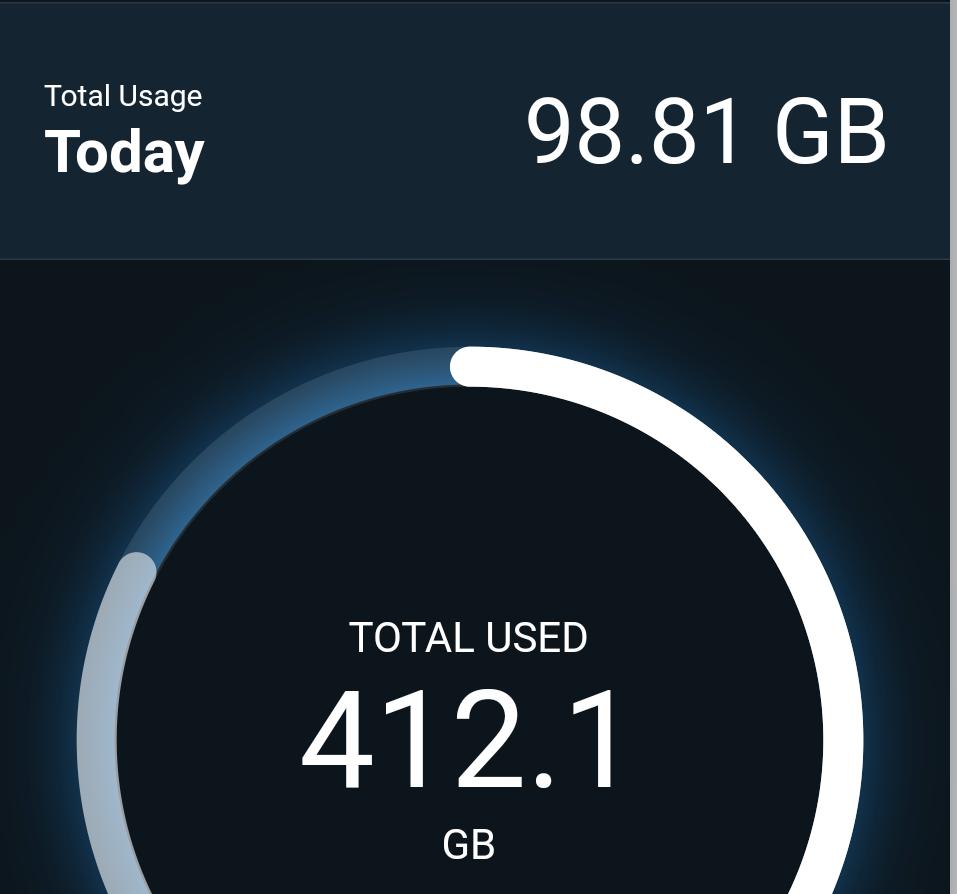
Based on the title you can call me stupid! But unknowingly you are equally confused. You have to choose between time and internet. And you can’t save both.
Because you ignore large paragraphs ,I will explain and conclude in points itself!
- Since internet became cheaper in India, the usage skyrocketed. But the new problem began when it has to be consumed within a day.
- Therefore you started pre-planning and strategizing what to watch? how much to watch? when to watch?
- You even started bragging about you never wasting internet. Some percentage of users never cared about wasted internet, but when somebody showed them in how many ways the data they wasted can be used. They used to regret it! AGREED?
- “Both extremes are flawed”. I am conveying this point.
- Those who bragged about never wasting internet. Don’t waste your valuable time downloading content which you were never going to watch. You are not wasting time while downloading it, you are going to when you watch it.
- And those who have lived without caring about the internet left. Even though internet is not more valuable than time. It can build you in a better way. You can plan in advance and utilize it . I’m not forcing you to exhaust it. Just give it some thought.
- What you can do when data is about to get wasted: 1) Upload all your photos , videos and docs to cloud storage 2) Download some online tutorials on Youtube (related to your domain, must watch, not some random crap) 3) If you have subscription of any music streaming service download your favorite albums 4) Download some IDE’s , Softwares and tools which are used by professionals in your domain/field(Try something new)
- CONCLUSION:(I have so much say, keeping it shut because “Cut the crap is new norm”) -> Your first priority should be your time but don’t neglect internet, the best resource you have . Unnecessary downloaders and time wasting people like me, you need to calm down. Internet isn’t water, but time is!
- FIND THE MIDDLE-GROUND, THANK YOU
Buying new smartphone: Expect this based on budget
Most of the times buyers pay premium for their smartphones because they didn’t know what they should expect. Brands use this as an opportunity. They launch the new smartphone at premium price. Therefore this checklist comes into picture.
Here I am listing the features, specifications and quality your new smartphone must have based on the price range.
Let’s start from the lowest price range:
Range A: { Below 5000₹ }->
- 480p Resolution display
- 3000mAh Battery
- Android Go edition devices are recommended
- Android OS version should not be more than 3 years old.
- 16GB ROM
- 1GB RAM
- Dedicated memory card slot is compulsory
- Mediatek Helio G30 series processors are preferred.
- Average single cameras on front and rear
- Be ready: You will get lot of bloatware apps pre-installed, cameras work only average in good light, Terrible at low light, Lags at times.
- Memory card slot is important than dual sim functionality.
Range B: { Between 5000₹-10000₹ }->
- 720p Resolution panel is must
- 4000mAh Battery
- Android OS version should not be more than 2 years old.
- 64GB ROM
- 3GB RAM
- Latest Mediatek Helio G and P series processors perform great. Snapdragron 600 series is fine too.
- Megapixels don’t matter. If a single camera or a dual rear cameras system is provided. Check the camera samples and make sure the images are balanced.
- Selfie cameras shouldn’t need to be high megapixel ones. They should produce realistic photos.
- Be Ready: This price range is perfect for first time smartphone users in age group of 16-25. They might lag if pushed too much. Low lighting conditions is Achilles heel in this smartphone cameras. If a power user better pay a bit more.
- Fingerprint scanner must above 8000₹
- Atleast 10W charger must. Type-C port is a good thing.
- Make sure it gets android updates for atleast 1 year.
Range C: { Between 10000₹ – 15000₹ } ->
- FullHD display is compulsory.
- 4000mAh battery
- Latest Android OS version is recommended.
- 64GB ROM
- 4-6 GB RAM
- Mediatek Helio G series but their higher end variants and Snapdragon 660 series . If possible find a phone with 700 series if you are planning to game.
- Dual sim+ dedicated memory card slot.
- Type C port is compulsory
- Fast Charging capable at-least 15W.
- Rear cameras setup might come with triple or quad cameras. But they are useless. SCAM! Better get a dual camera device with good sensors from Samsung.
- Selfie cameras should be equally powerful as rear ones.
- Fingerprint scanner must.
- Be Ready: Even though you have paid 15000₹ you might not get a very good camera. It will be decent. More than enough for daily use.
- Make sure it gets android updates for 2 years.
Range D: { Between 15000₹ – 20000₹ } ->
- FullHD+AMOLED screen is recommended. IPS LCD Screens are also fine. But AMOLED screens are a feast to eyes. (90Hz screens is a good add-on)
- Device must be made of metal or glass
- 4500mAh battery
- Good speaker setup is also important.
- Dedicated memory card slot must if storage less than 128GB
- 6-8 GB RAM
- Snapdragon 700 series or 2 year old 800 series processor is also fine.
- Type C port is must
- Must get at-least bi-monthly security updates and guaranteed 2 version upgrades.
- Cameras should have at-least Ultra-wide sensor and good quality rear camera.
- Front cameras should be impressive.
- Night light and low light performance must be good.
- 25W Fast charging compulsory and charger must be included in box.
- Know this: Can’t expect flagship level cameras and flagship performance. But more than enough for 95% users.
Range E: { Between 20000₹ – 30000₹ }
- AMOLED screens compulsory with FULLHD+ resolution.(90 or 120Hz screen must)
- Glass body and metal chassis are recommended for strong build.
- 8GB RAM
- 128GB ROM
- 4500mAh battery
- Cameras should be marginally better than Range D phones. More versatile ones. Should capture images a bit less impressive than Flagship cameras.
- 30W Fast charger must
- 5G ready phones powered by Snapdragon 765G are a good deal. (Snapdragon 855+ is a good deal)
- Night light shots should be decent.
- Know this: This range is an overkill for normal user. If you use phone extensively only then buy them.
- You are not getting the best in the market. But they aren’t normal phones either.
- 2 year software updates must be guaranteed.
- Headphone jack is must(depends on you)
Range F: { Above 30000₹ }
- AMOLED screens are recommended. 120Hz displays are compulsory.
- Flagship processors must power these devices.(Snapdragon 865+ or 865)
- 4000mAh battery is must at-least(Flagships generally have lower capacity batteries)
- 256GB ROM devices are future-proof. 128GB is enough too. But not value for money.
- 8GB RAM is minimum.
- Best camera in the segment. All lighting conditions.
- Impressive Night and low-light camera performance.
- Observe one thing: You get 12MP camera sensors and lesser number of cameras. Don’t you think now that they were fooling you in the budget segment by advertising about useless triple and Quad cameras.
- 3 year software updates must.
- 50W Charging compatible.
- 50W charger bundled with device.
- Memory card slot is an added advantage.( Rare to find)
- R.I.P Headphone jack
Hope it helps. Check these criteria before finalizing your new phone . Thank you.
Forgetting passwords is better than using the same password for all!

Passwords are the key to your digital treasure. You literally sweat when you try to set a strong password by satisfying all the criteria. Most hated statement “Password must have minimum 1 upper-case character, 1 lower-case character, 1 number and 1 symbol“.
You will have to carry that stupid password in teeny-tiny hippocampus of your brain. By fearing that you will forget it you commit a blunder i.e “I will use the same password for all my accounts, I will keep using it many times a day so that I will never forget it.”
What I am trying to convey in this post is just a simple thing. Don’t fear that you will forget the password. It is fine. You can recover it. Forgetting passwords is not a crime. Let me prove why it is better than using the same passwords for all your accounts.
Let us keep it short by explaining my theory with valid reasons via below points:
- It is a crime according to me to keep the same password for all your accounts. Because if one account gets compromised , all the accounts will be in danger and you have to change all the passwords again.
- It is recommended to keep changing your password every 3 months. If you forget it. Recover it using many other methods like OTP generation, getting reset link to your gmail. But the main aim should be password staying a secret.
- Your password should never be based on your username or e-mail id.
- When you forget your password, you in-directly make your account more secure and strong because you get a chance to “take security checks, routine maintenance and even logging out of all the devices at once and ask for new password“.
- If you lazily set the same password for all accounts you will never change it because you never forget it. Due to that the device in recent photocopy shop you had visited has your account signed in because you had no idea had forgot to sign out. Now did you get it? How healthy practice is forgetting passwords;)
- I’m not forcing you to forget passwords. I’m just saying set a difficult and unique password to each of your accounts and if you forget them reset them without thinking too much.
- Online platforms and Social media giants have realized that how common it is to forget a password. So they have provided 3-4 ways in which you can set a new password/Reset it. Don’t hate yourself.
That’s it. Next time when you forget a password. Happily reset it. Thank you.
New software update available: points to ponder
Software updates are a tricky topic. Some people regret after updating that the old version had this feature that feature and they miss it. They also complain new version is not that good. Another majority just rave about the new features , design refreshments(look and feel of UI), they become very happy.
Both the above scenarios reflect how important the software updates are. Polarizing reviews and thoughts. This confuses you and you just start playing safe and never update the smartphone. I will help you decide. Just ponder over the below mentioned points and make sure about them before updating.
- Does any of your friends have the same model of smartphone that you use? If YES message them and get their review if they have already installed the update.
This is enough! - Google and even check for reviews recently uploaded on Youtube about “Hands-on and initial impressions” of the latest update to your specific smartphone model.
- If you find any complaints on the internet and community forums about the latest update, analyze and think about the the probability of the issue affecting you and also what are the most severe bugs and issues. If they affect usage heavily postpone updating your smartphone.
- There are three types of software updates to smartphones(especially Android ones) 1)Android System updates(major versions like Android 10 to Android 11) 2)Android Feature updates(Minor changes and Bug fixes also can include new features like update from v1.23 to 1.25) 3)Security updates(Security patches that arrive monthly and minor bug fixes specific to your model like from August 2020 to September 2020)
- If you do not find any major issues or flaws in the latest update anywhere. Install it and take the chance. Because if you don’t you are losing on many new things too. Don’t be over-sensitive.
- Security patches make your devices more safer and secure. Don’t postpone installing them.
- Some premium device manufacturers charge premium because they provide faster and longer software update support. Therefore you are indirectly paying money for each software update you get.
- You might be well adjusted to old UI and old features. But newer UI and removal of some features are a result of hard work and forward thinking of design and development teams. Don’t let their efforts go on vain.
Conclusion: Neither hurry nor ignore , take your time and do some research and then install the updates.
I am an enthusiast , I literally dance when I see a new software update. They should excite you too;)
Newest version might not be the best. But, it acts as a stepping stone for the next major update.
Stop watching pirated movies and shows. No more excuses!
I strictly stopped watching pirated movies and web series’ in December 2017. If you are still doing it, you should stop too. I have heard all the excuses people give and I am addressing them all here.
- Excuse 1: ” Everybody does it, what difference does it make if I do it?”
Why you should stop : The most popular practice and behavior makes a lot of damage because everybody starts following it blindly. In the same way nobody gave a second thought to how piracy is a criminal activity. I will tell you how: “Pirated downloads generate revenue to people who didn’t put any kind of efforts to create content, It leads to loss of revenue , It also leads to illegal distribution and reselling of content for lower prices”.
- Excuse 2: “It is not affordable to watch on official platforms”
Why you should stop: Amazon prime video and Netflix both launched in India in 2016. Based on Indian users’ price-sensitive mindset. They have priced the plans at the lowest costs. Even the local players are competing with monthly plans. When you compare the cost with what you might spend on movies tickets. Start paying and stop bragging that you get everything for free.
- Excuse 3: ” My friend gave me, I never download it”
Why you should stop: It doesn’t matter who is downloading in a pirated manner. It makes it difficult for the makers and producers and even the streaming sites to analyze whether that specific title was a hit or a flop. Lesser the number of people watching the movie or show legally, harder it becomes for the streaming giants to trust and sign contracts with the makers.
- Excuse 4: I can’t watch all the shows and movies on a single streaming service.
Why you should stop: This is a reasonable excuse. But recently there have been efforts by the Internet service providers like Jio and Airtel to provide there subscribers with free subscriptions bundled with Data and Voice plans. You can also watch content on Amazon prime video for one month and the very next month you can invest in Netflix subscription.
What I do and how I have managed without downloading and watching a single pirated movie or show since last 3 years:
- I decided that I will never watch pirated content in 2017. I might have missed some shows like Chernobyl due to that rule. But I didn’t break the rule.
- I buy subscription for Netflix just twice maybe thrice an year. I watch what I want and play catch up. Then I stay away from the platform for 4 months.
- I don’t even recommend anyone to watch shows or movies on illegal sites. I try my best to depreciate people who brag that they can watch this or that freely. I explain.
- I deleted all the movies that were of very high quality that I had stored locally in my Laptops and Hard disks as movie downloads.
- Have never used Telegram and pirated content hosting sites. Many of you have no idea how much loss and damage to talent you are causing because of easy access to Telegram groups.
- I admit that I ask for passwords if my cousins or family members have active subscriptions. Because it is the safest way to watch a movie or show.
- You are risking safety and security of your device by downloading and copying content from pirated sources. That is I never visit illegal sites and links.
Free is not always good. Paying money is not being dumb, it is respecting the talent and hard-work that goes behind making the movies and shows.
Pirated movies and shows hosting sites and links can take you to malicious sites and hackers can misuse the opportunity to hack and take control of your device.
Thanks for reading. Please give some thought to this topic seriously and never watch pirated content from now on. Hope it helps.
How to get decent photos with your smartphone camera
You don’t need a DSLR camera, You don’t even need a flagship smartphone(like the latest iphones, Samsung’a S series and Note series phones) either. You can take decent photos with most of the mid-range smartphones that were released in the last 3 years. Phone cameras have really gotten better.
These are the things I pay attention to when taking photos with my three year old Xiaomi Mi A1.
- Analyze the photos your phone camera takes keenly: You have to initially not judge performance of your phone camera. Don’t underestimate it. Click as many photos in very different lighting conditions as possible. Give it time. You have to then look at which lighting conditions and colors your phone camera produces in the more natural way. So that’s it ,never forget to use that conclusion of analysis while clicking photos with your phone camera in the future. Get good insight about photos it takes. You can edit better if you do this.
- Click pictures with HDR mode ON(High Dynamic Range): My favorite option of all time. This mode gives you very neutral looking shots. What it does is, it takes a picture by taking in high levels of light i.e brightest and another shot with least amount of light i.e dimmest. Final image that you get will be a balanced and neutral looking shot obtained as a result of combining both those bright and dim shots. It is preferred generally while taking photos of bright objects(sun, flowers, grass , portraits with lighting from behind). You can get best shots by using it in 90% of photos you click. Better keep it ON always. HDR FOREVER!
- Don’t give up till you get the accurate colors: What I hate about most smartphone cameras is unrealistic colors. Redmi, Realme and with some other budget phones Image processing is too much aggressive. In reality if the color is Orange or Saffron you will get a Red color in the photo. Now shouldn’t happen. To fix this you either have to use a third party camera app like Camera MX . But it doesn’t affect too much. To fix this issue completely you need to install GCAM or Google camera mods available for your specific smartphones model. Try it.
- Lighting is of highest priority: Before clicking pictures make sure the frame is evenly lit. If it’s outdoor sun light should directed towards the frame. If you can’t change anything in lighting, At-least you can control it by tweaking ISO. Check below screenshot to see how to tweak.
- Don’t Zoom into unnecessarily: If your phone camera has Optical zoom in some cases colors are very different for two camera sensors. Therefore either crop into a full image to get a clear shot. Zoom is literally quality degrading feature. You will get the closest shot but it’s literally useless. I really don’t appreciate that.
- While clicking a picture think that it is the only shot you are allowed to take: What is inside the frame OR what you see in the camera view finder that will be the photo you get. By forcing you to push beyond your capability by guessing what looks better in advance gives you the best shot quickly. That’s enough I guess.
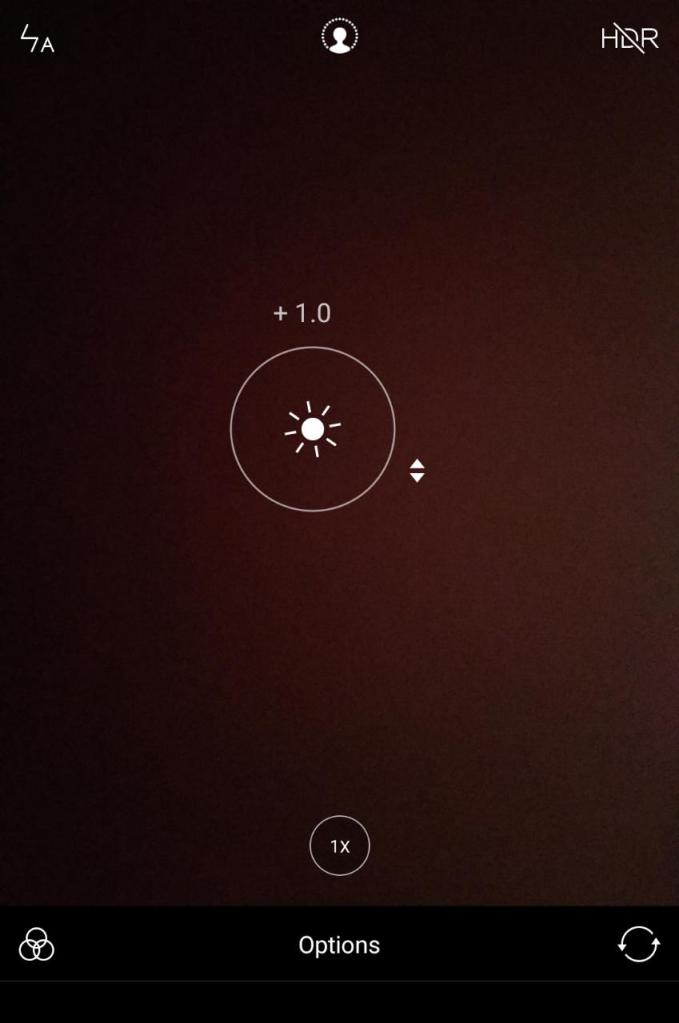
There are literally hundreds of things. But I assure you will get decent photos by just keeping above listed things in mind.
Don’t underestimate your skills. I really don’t pay attention to nothing much either. Mega-pixels don’t matter, how costly is your phone also doesn’t affect. Decent photos are mostly reflection of our curiosity and intuitiveness. Skills and tricks shouldn’t be ignored too. Thank you. Hope it helps.
99% of the photos I have posted on my Instagram account(venkatesh_dixit) are clicked with my 3 year old Xiaomi Mi A1. I will keep using it till it dies. Because it has proved it’s worth. You and your phone camera make a good pair;)
How to open links from a photo?
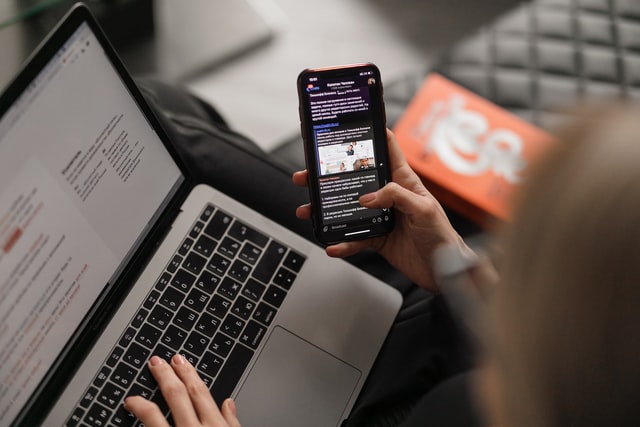
Have you heard about the app Google Lens? It is pre-installed on some of the latest android devices. It can be used for a specific purpose which might help you save time. If it is not installed on your phone , tap here to install. It is available on Apple app store too for ios users.
SCENARIO: Your friend sends you a photo which has a link in it. Because it is a photo you can’t open link directly just by clicking on it. Hyperlinks aren’t active. You type each and every letter into the browser. Because it is cumbersome and error-prone. I am providing you a better alternative.
STEP 1: Take a screenshot with the link in it which you can’t click directly. If it is an image already, no need to take a screenshot too.

STEP 2: Open the Google lens app.
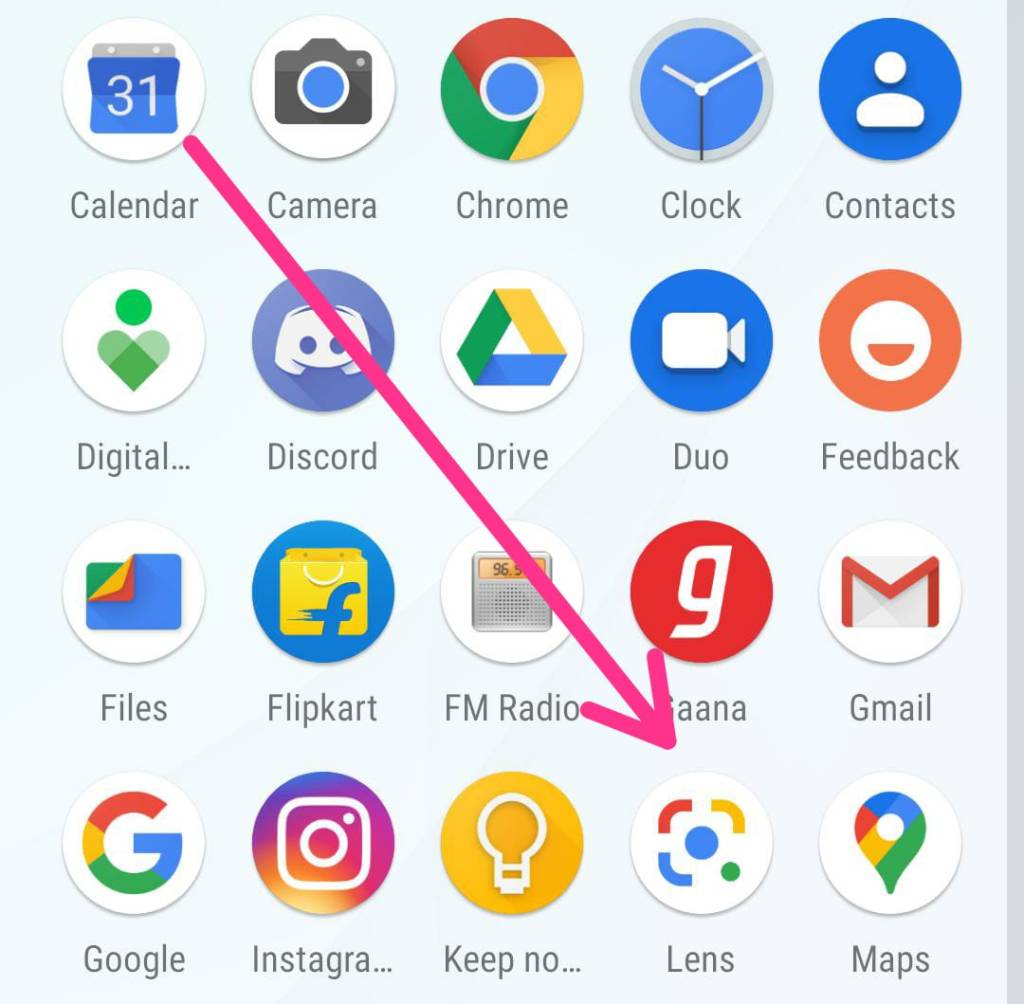
STEP 3: After opening when you see the below interface. Tap on the image icon beside search icon slightly left at the bottom.
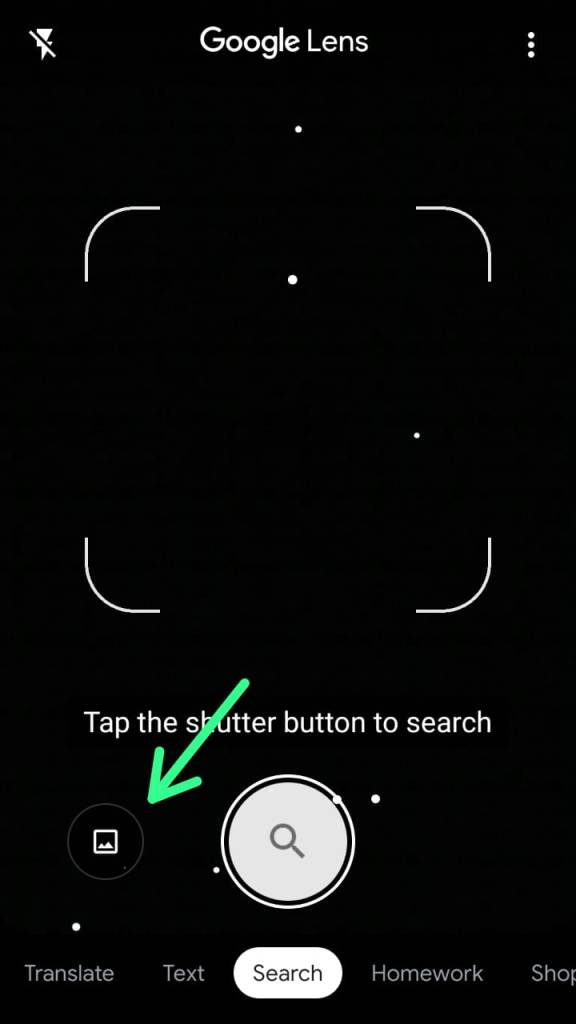
STEP 4: Select the screenshot from the gallery or file manager from which image you want to read the hyperlink. Procedure looks lengthy but it isn’t. Quick!
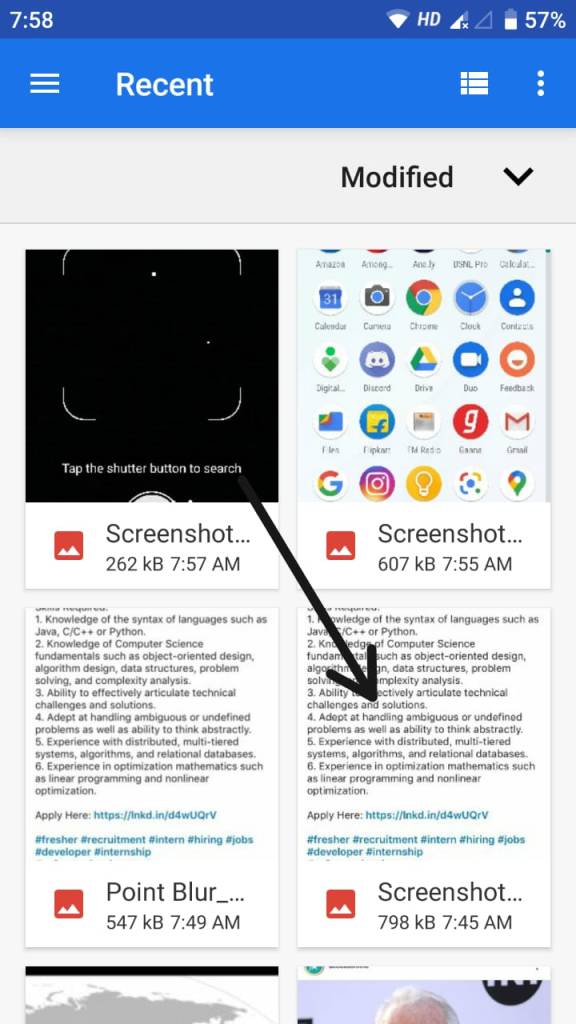
STEP 5: When you select the image or Screenshot. It automatically detects the link. Tap on the highlighted link area to open the expected website or page or maybe a video.
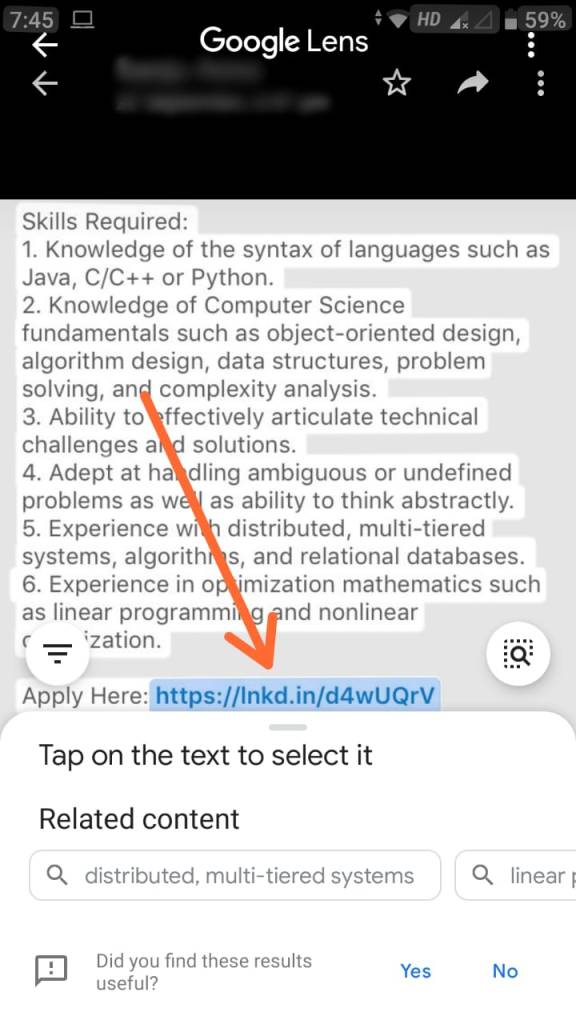
RESULT(KEE HOO WE DID IT😁): This is the desired page you were doing gymnastics to land on.

That’s it. Hope it helps.
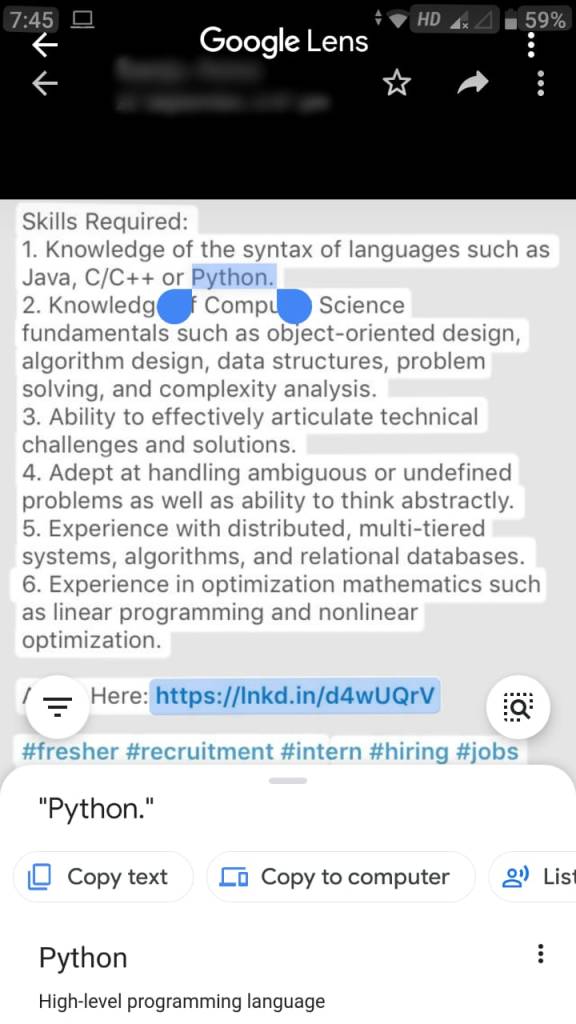
If the right link is not highlighted you can try this.
Tap on the desired portion of the screen. This is useful when you want to google a specific word in the image also.
How to not get addicted to your smartphone: Tips by a former addict

23 September 2020 Wednesday
Reading time: 6 minutes
PHASE 1: If you just bought a new smartphone. Make sure you keep these things in mind:
- You are in a really interesting world right now. But when you start using the smartphone and start feeling this virtual and simulated world (i.e time you spend using smartphone) is more interesting than the real world. Exactly at that point of time, turn off the screen of your phone. Remember: Real world is the best world and must be your highest priority.
- Don’t use your phone more than 3 hours a day.
- Use it to help you become more productive. Read books on it, List tasks to be done, Whatever you read online make sure it is worth it and note it down in writing. Make it count. Develop skills using it. Skills that matter in the real world too.
- Whatsapp , Facebook , Instagram or any other social media apps are a boon if used just to keep in touch with people. Unending feeds and thousands of short videos are going to get generated again. Being updated is a myth. If you have the right info at the right time that’s enough.
PHASE 2: You are using your phone extensively since 6 months and you spent most of the time doing nothing else:
- You haven’t lost much yet. It’s time to get realistic.
- Keep this in mind. The movies you watch, games you play, news you read or anything else. Your brain is processing that info. It stops producing it’s own. This is just my own experience.
- Smartphone is just a tool. Use it fill the knowledge gaps you have. Real learning happens when you start studying ,implementing and creating something of your own.
PHASE 3: After 1-2 years. You have faced some academic failures. You are in panic mode right now. But you are helpless:
- First sign of addiction is when you deny with anger , when somebody says “YOU ARE ADDICTED”.
- Take help from people around and slowly reduce your smartphone usage. Take a 21 days no phone usage mission. Rediscover yourself.
- You are also addicted in some or the other way if you say this sentence: “I do useful things, I am not like others”.
- Spend most of your time on other activities like “help your parents with chores, take a walk with your sibling, read without distraction, continuously for 1-2 hours “.
PHASE 4: Three to four years later. You have no skills, no hopes. You are just with your smartphone. You are trying hard not to use your phone. You are failing terribly:
- I will tell you how I overcame it.
- First of all. I had to compare myself with my classmates, siblings and achievers of my age group who were doing great in every field. (Not for a non-addict)
- I analyzed and acknowledged whatever mistakes I was doing. I even asked people around me.
- I slowly started working to achieve small goals. Like doing good academically, Re-gaining interest in other things. Listening to people around. Communicating your ideas. Developing a good social and friend circle.
- When I started feeling happy about my improvements and willingness to inculcate new skills. I stopped comparing and regained my lost confidence and consciousness. That was me. You can try it too.
- You will set free from addiction slowly. But for sure. Don’t lose hope.
- Set App timer, Night mode, Stop using phone after 11 P.M at night and max time you spend shouldn’t be more than 5 hours. Later you can cut it down to 3 hours.
Even if you didn’t know till now that you are an addict. Now at-least you know you are. Don’t deny. Take the right measures at the right time.
It is as serious and damaging as any alcohol, drugs or others. Because it affects you mentally and is a pure wasted potential.
Set your priorities right and keep balance. Too much is too bad. I have personally faced all these ill effects and they are not worth it. Smartphone is just a life-enhancing tool. Not your life itself.
Hope it helps. Thank you.

Venkatesh Dixit
I got my first smartphone in May 2012. It was not an Android. Java based one running on Bada OS. I couldn’t do much with it, anyways I lost it in August 2013. But it was the basis of my addiction. Even though I couldn’t do much with it I used to spend 2-3 hours playing just 2 games on it. After a gap of 6 months I got my mom’s Galaxy S Duos. The same usage pattern continued. But it didn’t affect me then.
Micromax smartphone I got in May 2014. Literally became the example of real smartphone addiction. I used to spend the whole day with it. But I never used to realize I was addicted. It took me 3 years to overcome addiction.
Don’t worry, I’m fine now. I overcame it. But it took it’s toll.
 techpecker.tech.blog